Booth owners, by a booth ownerFor booth owners, by a booth owner

You take one photo. Your guests take the rest.

The setup shot you already take lands on your Google page. Your guests do the rest.The setup shot you already take before doors open lands on your Google page. The photo text guests get does the rest: some add photos, some leave reviews, and one books you for her party.

No new app for your guests. You already send this text. You write it.

Andrew, The Photo Booth Guy. I built this for my own booth. The first 20 owners get set up by me.

Month to month. Cancel any time.Month to month. Cancel any time. More reviews, event for event, or 3 months free.

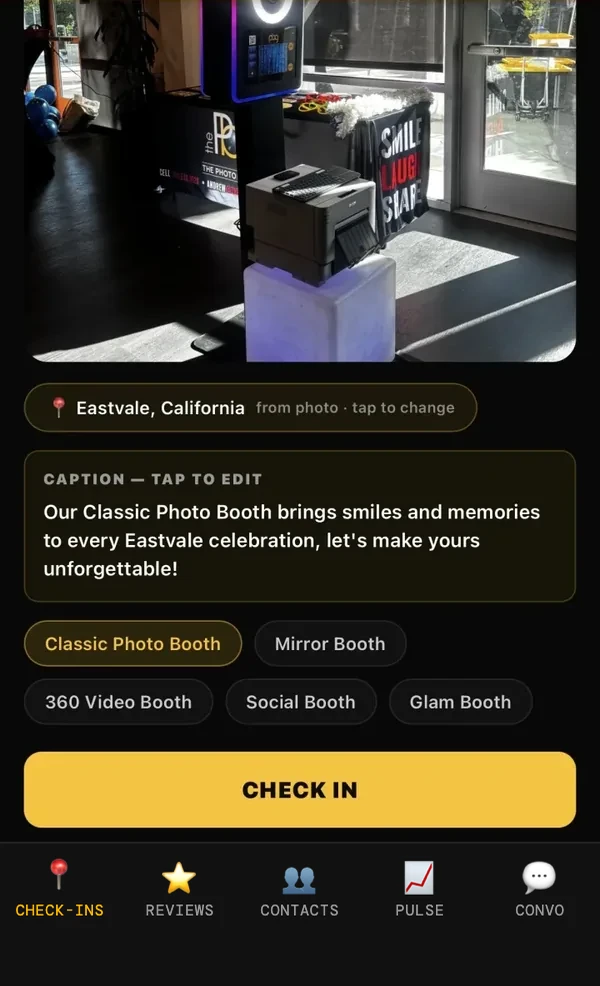
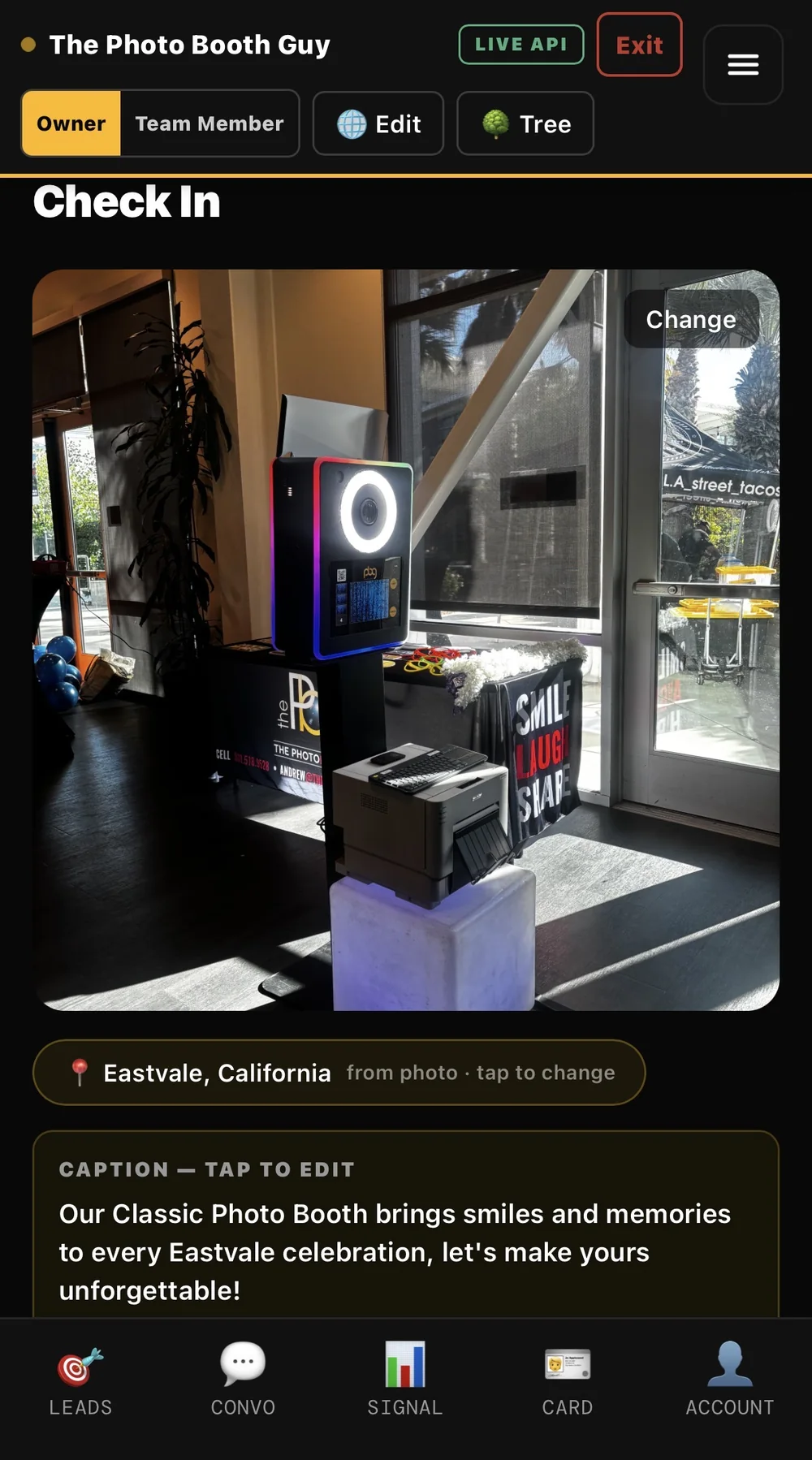
You once per eventThe HoneyBun Check In screen for The Photo Booth Guy: a photo of the booth setup, Eastvale, California read from the photo, a written caption, and the bottom tab menu
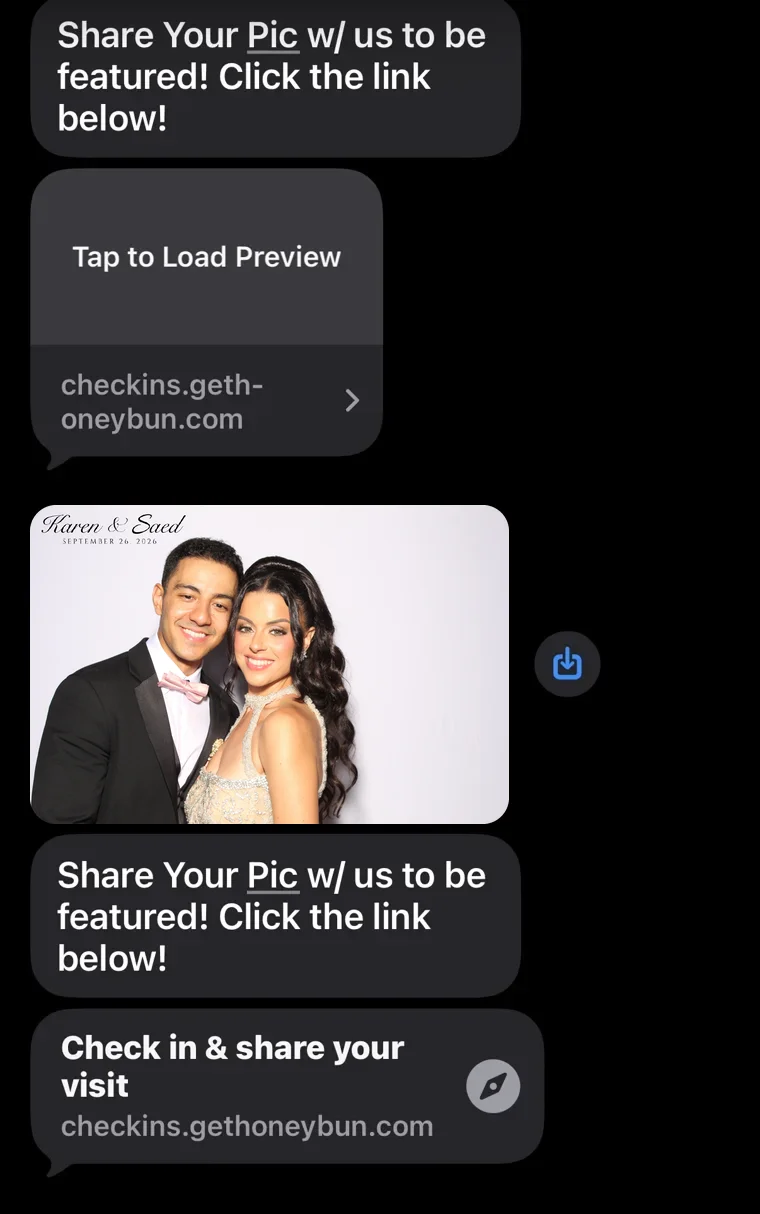
Your guests on their ownThe photo text guests get: the couple's booth photo, the line Share Your Pic w/ us to be featured, and a check-in link

Case study: The Photo Booth Guy, every check-in since June 2026, as of Sep 30

72
Check-ins since June
305
Placements from those check-ins
40
Cities reached
10 sec
Your part, once per event
Booth photo of the founder of The Photo Booth Guy holding a snake, on an adventure-map backdrop
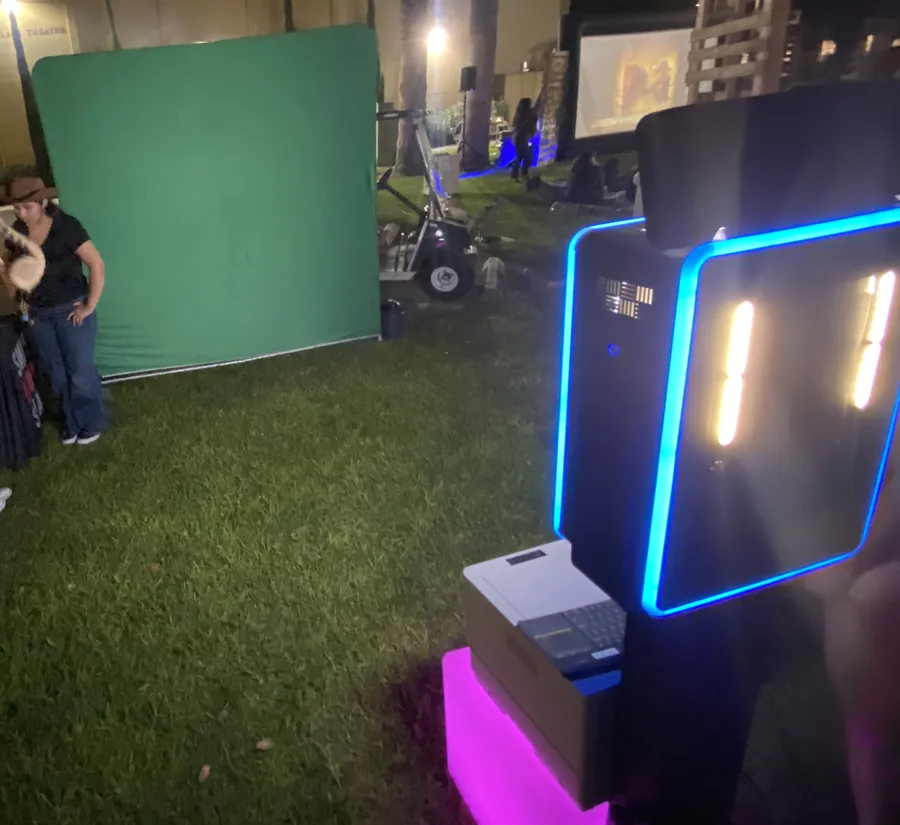
The booth setup at the same event: a green screen backdrop and a lit booth with its printer, on a lawn at night
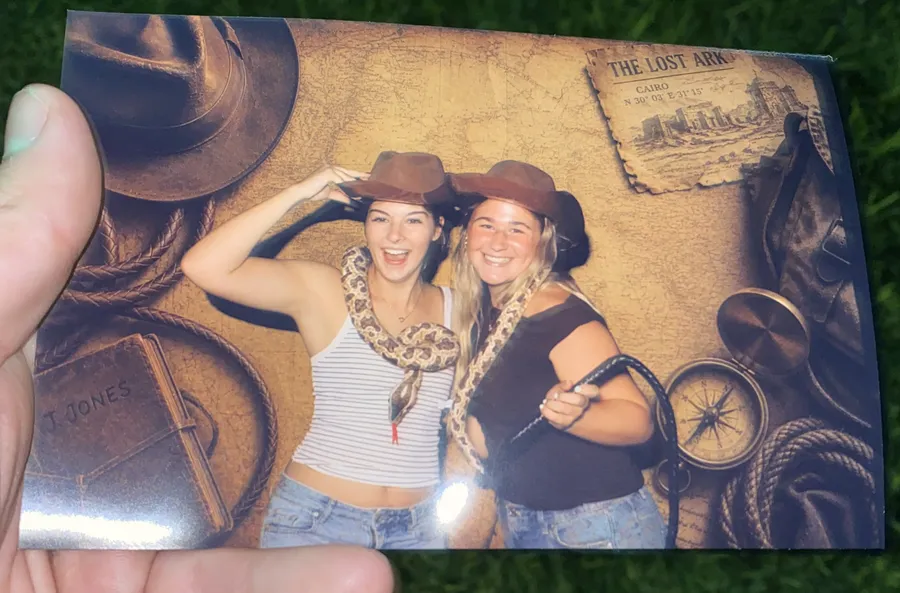
A print from the same event: two guests in cowboy hats with a snake on an adventure-map backdrop

Every check-in is its own card on your check-in page. Each card links to your booth page, and to your occasion and city pages if you add them.

01 / The problem

Your Google page is why they did
not call.

Someone searched "photo booth Newport Beach" last night. Google showed three booths on the map. Yours was not one of them. The top one has 84 reviews and photos from two days ago. Yours has 11 reviews and a logo from 2019. They are not better than you. Google can just see them. The map shows three booths, and your Google page (your Google Business Profile) decides if you are one.

The booth that shows up gets the call.

Perception is reality. A client cannot book the best booth in town if Google shows her three others. Your rivals are not spending more. Their page is just alive. New photos. Recent reviews. The right hours. That is the whole game. It is just nobody's job on a Sunday night after a wedding.

Where your best work goes today

Your camera roll is full. Your Google is empty.

Saturday's setup shot is still on your phone. From there it cannot win you the next booking.

Illustration

02 / Your ten seconds

You take one photo. It lands everywhere.

The guest half runs on its own. This is the only part you touch: one photo of your setup before doors open. It lands on your Google page, on your check-in page, and on the city page for that town if you add it.

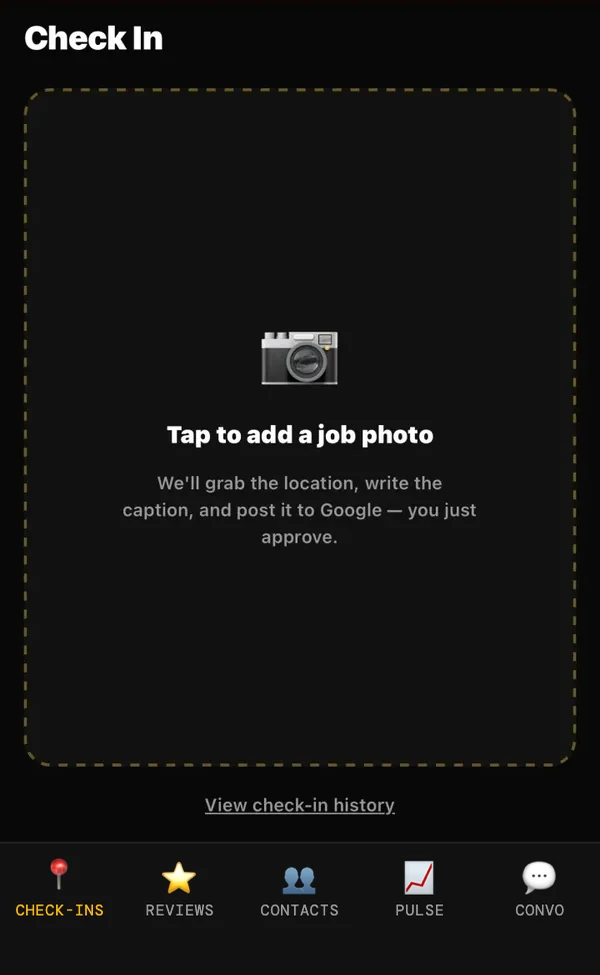
The HoneyBun app Check In screen with a dashed box reading tap to add a job photo
STEP 1

Tap to add a photo.

One shot of your setup, before doors open. This is the only thing you do.

The app showing the setup photo with the city read from the photo, a written caption, and a booth selected
STEP 2

It fills itself in.

The city comes off the photo. The write-up is written for you. Tap which booth you brought, then Check In.

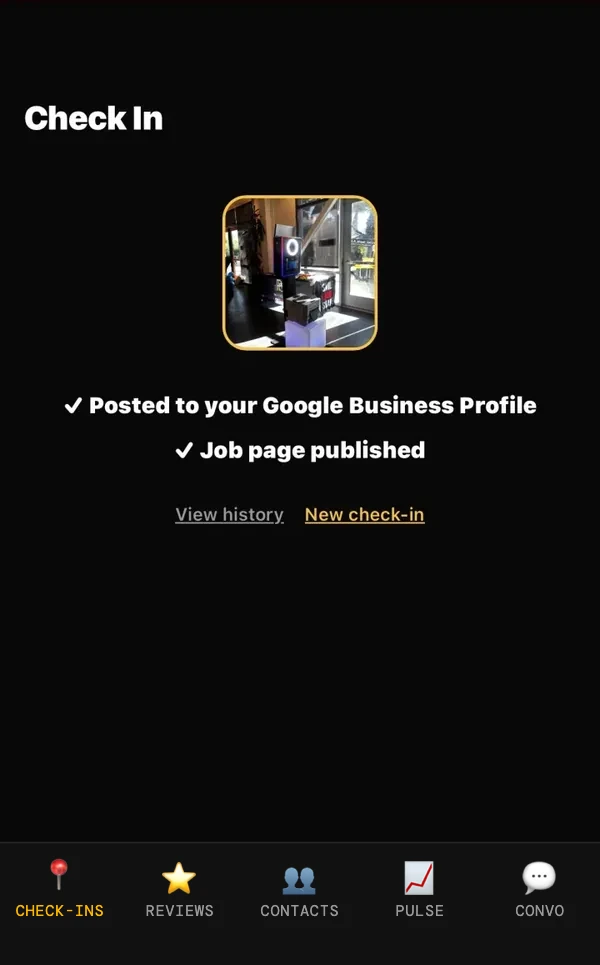
Confirmation screen reading posted to your Google Business Profile and job page published
STEP 3

Posted.

It is live before you put the phone down. Ten seconds, once per event.

Real screens, from a real event in Eastvale.

Here is what it looks like

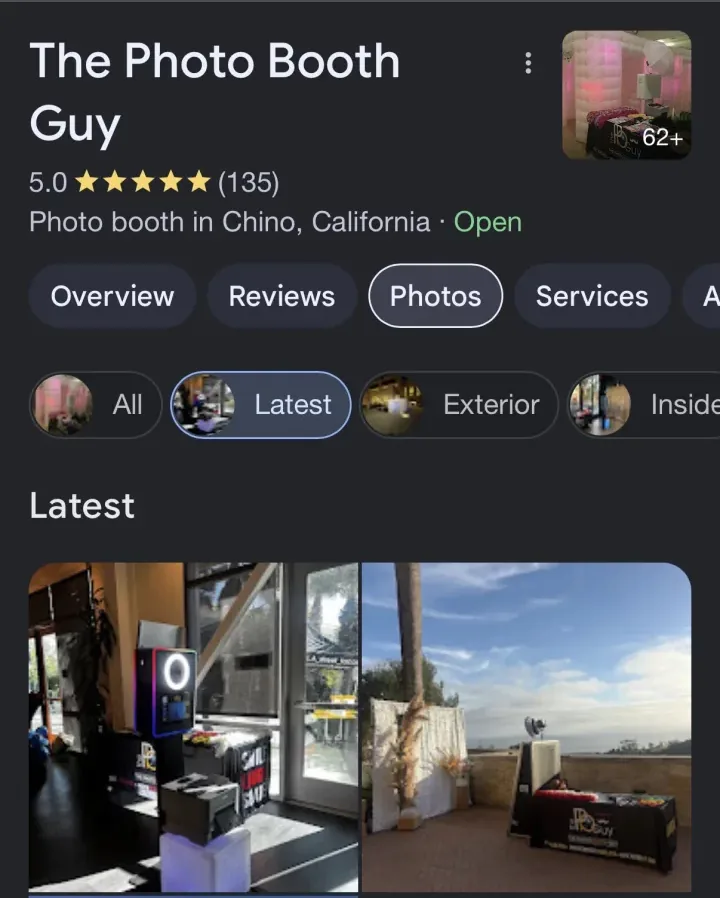
The Photo Booth Guy Google Business Profile, 5.0 stars and 135 reviews, with the Eastvale setup photo first under Latest
In every plan
Your Google page. The same photo, first under Latest on Search and Maps. This is the photo date a searcher sees.
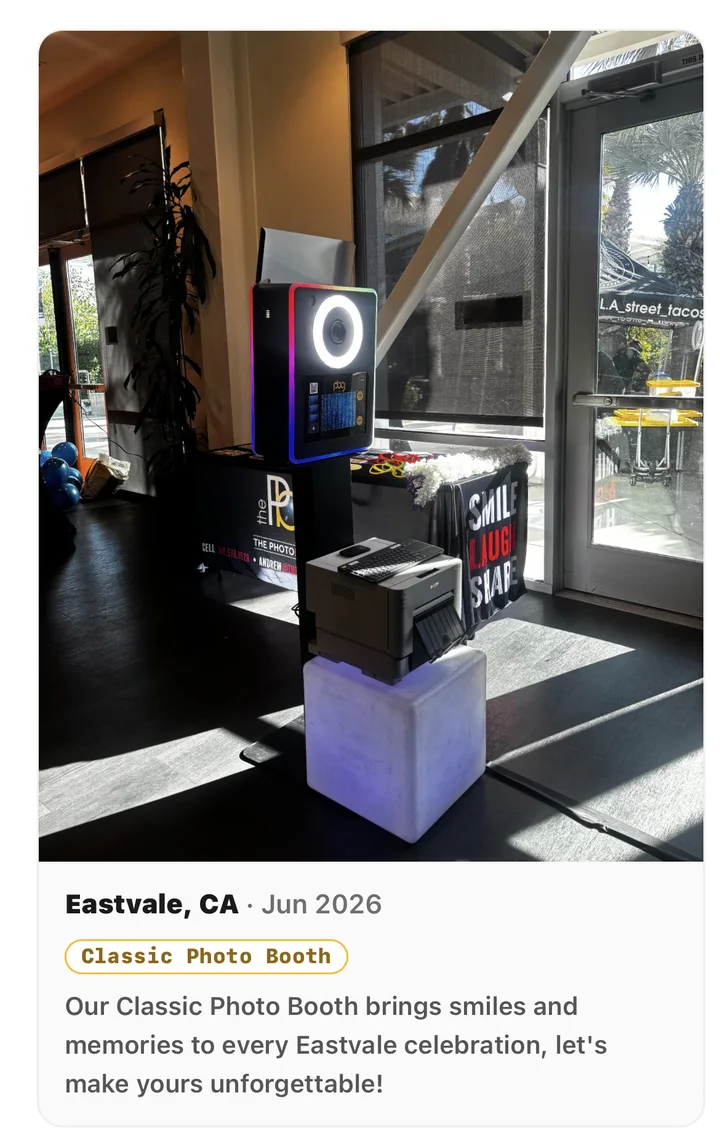
A card on The Photo Booth Guy's check-in page: the Eastvale setup photo, Eastvale CA, Jun 2026, a Classic Photo Booth tag and a short write-up
In every plan
Your check-in page. The same photo lands as a new card, with the city, the month and the booth you brought.
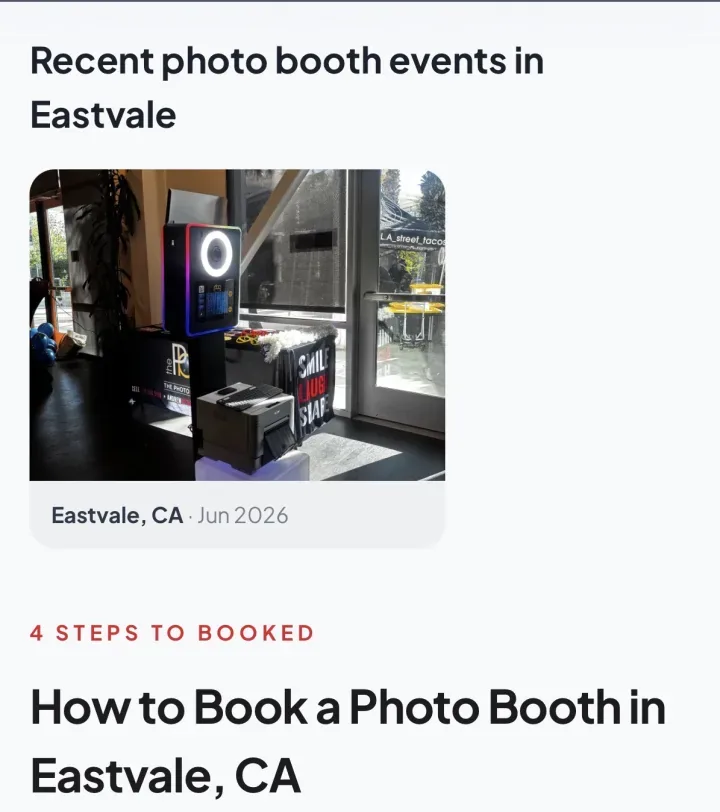
A city page on thepbguy.com headed recent photo booth events in Eastvale, showing the same setup photo dated Jun 2026
Add-on
The city page for that town. Work Eastvale, and the Eastvale page gets fresher. Same for the booth you brought and the kind of event it was.

Then your guests take over

Your guests, on their ownThe photo text you already sendYour words, with one link in it.Text message from a photo booth with the wedding couple's photo, the line Share Your Pic w/ us to be featured, and a check-in link
1

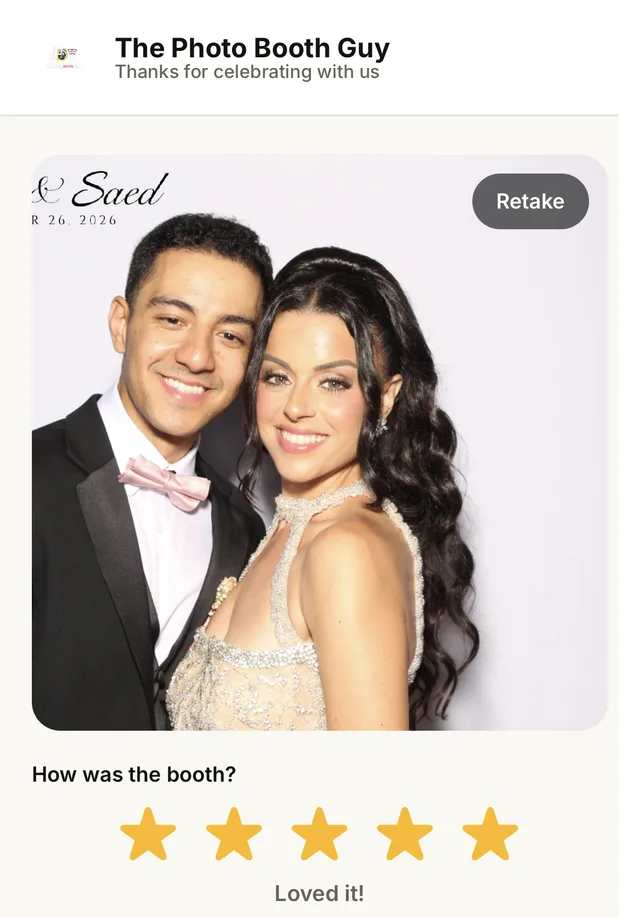
They add a photo

Or a short video from the night. Ten seconds.

Guest view: the guest's photo from the night, with a star rating under it
2

They get asked

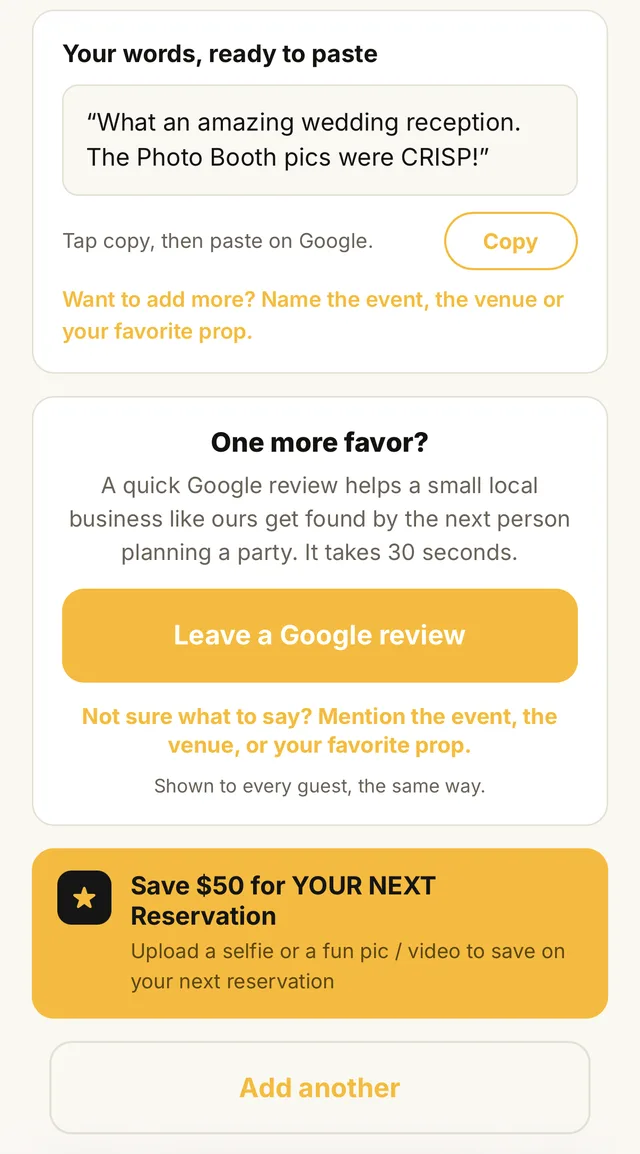
A Google review ask, with prompt ideas if they freeze.

Guest view: a Google review ask with a Leave a Google review button, then the owner's offer for the guest's next reservation
3

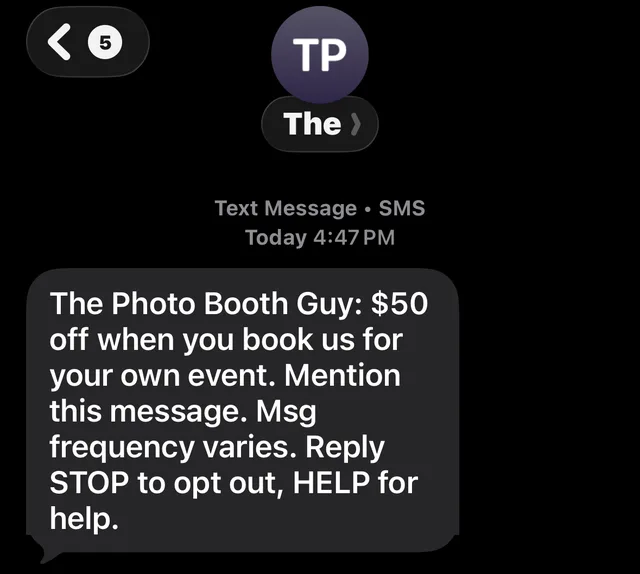
They see your offer

Ten percent, a free print, or whatever you choose, for their next party.

A text from The Photo Booth Guy offering $50 off when the guest books their own event, with message frequency and STOP and HELP instructions
4

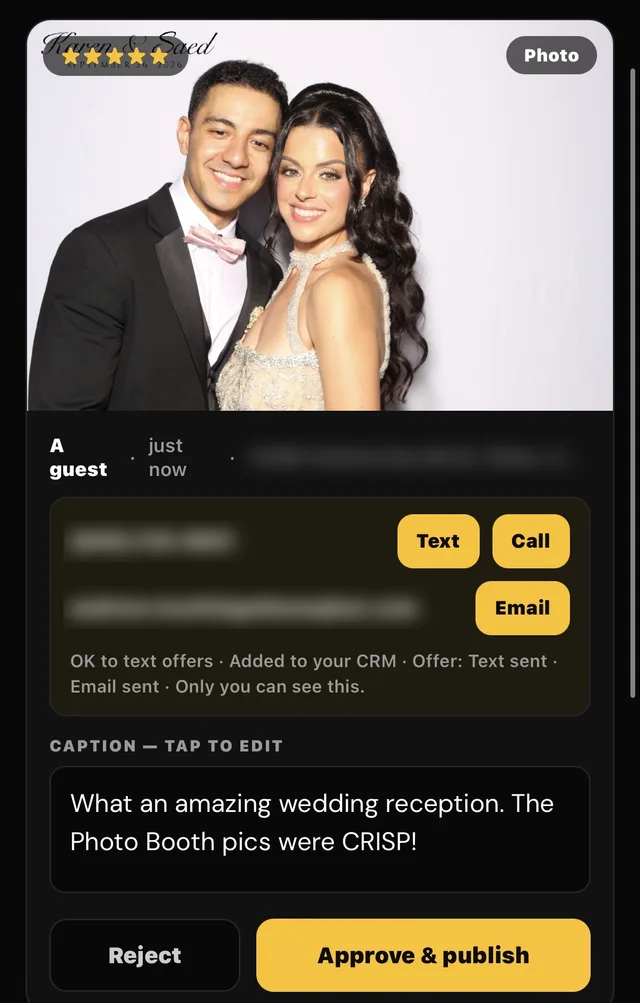
You approve

Nothing goes live until you say so.

The owner's check-in review screen: the guest photo with a star rating, the guest's contact details, an editable caption, and Reject and Approve and publish buttons

The whole flow

Four steps. Two run on their own.

  1. 01

    Sign up, connect Google, book your call

    Checkout takes a minute. Then you connect your Google page and pick a time with Andrew. On that call he connects your booking calendar, writes down your starting review count, and sets your categories, hours and services. Most booths have never set their category on purpose. It is the biggest lever Google has.

    One sitting, a 30-minute call
  2. 02

    Check in at every gig

    One photo of your setup. It goes to your Google page, and to your check-in page as a new card with the venue, city and event.

    Ten seconds per event
  3. 03

    Your guests do the rest

    The photo text your booth already sends has a link. Guests add their own photo, get asked for a review, and see your offer for their next party. You approve what goes live.

    Runs on its own
  4. 04

    Reply to reviews without writing them

    A new review comes in. A reply is written in your voice. You read it, tap approve, done. Google, Facebook and Instagram sit in one inbox, set up on your call.

    Runs on its own
03 / The ask nobody makes

The guests are not the only ones asked, your client gets asked too.

When guests text themselves a photo from your booth, the link comes with it. Your client gets her own ask after the event, addressed to her by name. Leaving a Google review takes her fifteen seconds.

Whatever she taps, Google is on the screen.

The bride who just paid you four figures is a likelier reviewer than any guest at her wedding. She is also the one nobody ever asks.

  • Great lands on the Google button, with prompt ideas if she freezes on what to write.
  • Could be better comes straight to you in private, and the Google link is still right there if she wants it public.
  • Nobody gets filtered. Both answers see the same review option, which is what Google requires and the honest way to ask.
  • Every review that lands sits in one inbox with Facebook and Instagram, reply already drafted in your voice.
Quick favor
How was your experience with The Photo Booth Guy, Isamar?

Takes about 15 seconds, thank you.

😍Great
😕Could be better
You made our day
So glad we got it right!

Would you share it on Google? A quick review helps other people find us.

Leave a Google review →

Even one line about your favorite moment helps.

04 / What you get, proven on The Photo Booth Guy

One page that shows every event you
have worked.

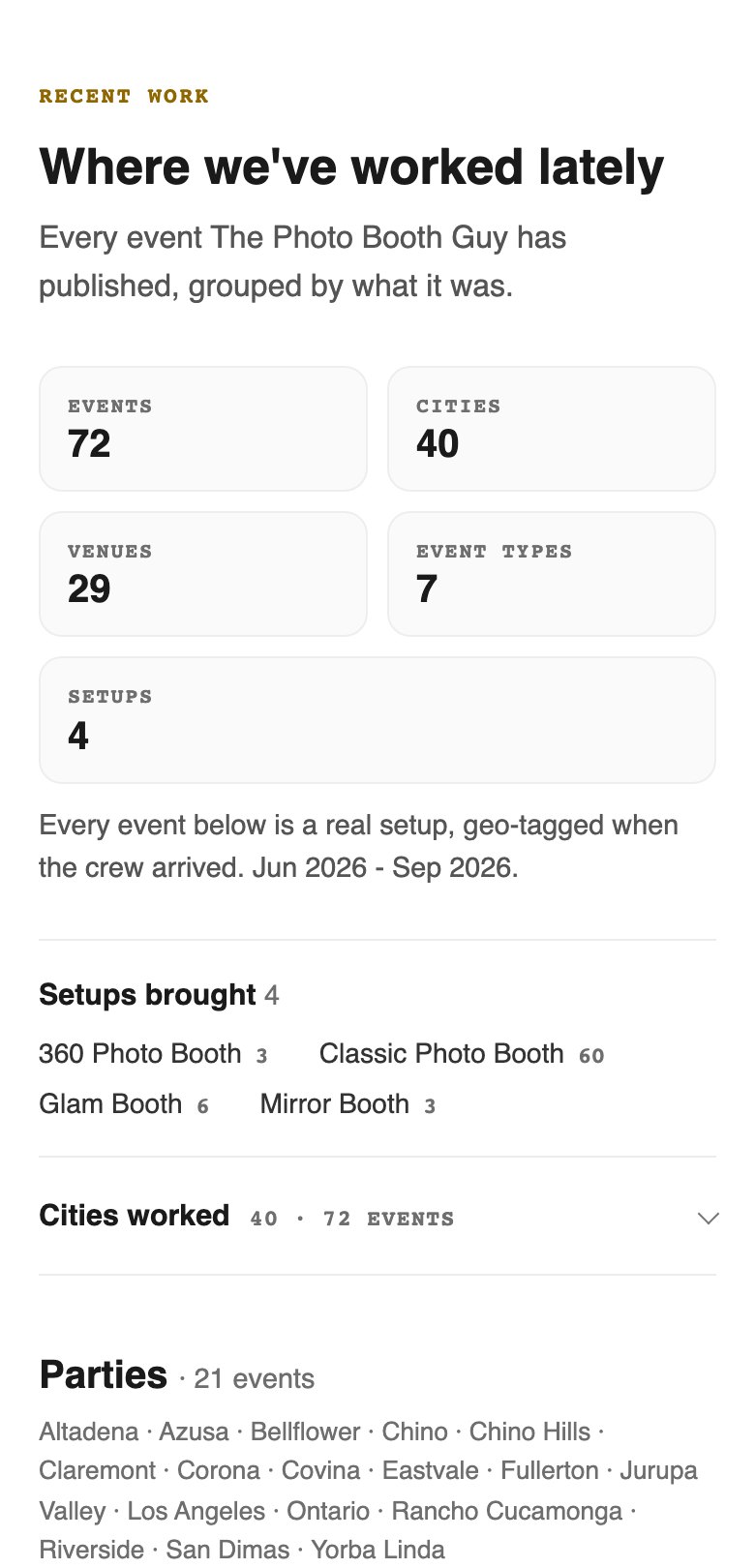
This is your page on the web, and it writes itself. Each check-in adds to it, and it is open to Google, not hidden behind a login. The top counts your events, cities, venues and booths. Below that, every event with a photo, the city, the booth and a short write-up. The Photo Booth Guy runs it on its own site: thepbguy.com/gallery. In the 11 weeks after check-ins started, that page drew 1.33 Google clicks a day, up from 0.47 in the 8 weeks before (Google Search Console). See the demo check-in page.

Top of the live check-in page: 72 events, 40 cities, 29 venues, 7 event types, 4 setups
The live page. The same counts as the strip at the top.
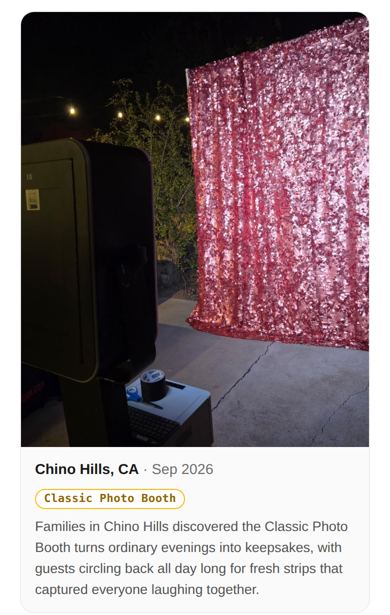
One event card: Classic Photo Booth in Chino Hills, with the setup photo and write-up
One event, one card. Photo, city, booth and a short write-up.
In every planYour check-in page

Every event you check in to shows up here. The write-up is written for you. Guest photos you approve show up too.

Add-onCity, event and booth pages

A page for "photo booth Irvine." A page for "sweet 16 photo booth." A page for your Mirror Booth. Your photos flow onto them, so each page gets stronger with every event. Priced per page.

Whole Operation or $30/moOn your branded domain or sub‑domain

The same pages on your own domain, or on a branded sub-domain if you would rather not share domain access. Standard on Whole Operation. On Get Booked or Get Booked + Crew it is a $30/mo add-on, and we add it and set it up on your setup call.

What the numbers on this page do not say.

  • They come from one booth company: The Photo Booth Guy, mine. It is the case study until other owners' results are verified. They go here when they are.
  • A placement is one event photo landing on one page. It is not a ranking, and it is not a promise of one.
  • Not every guest will leave a review. At a 120-person wedding, you need three.
  • No text, no link, no reviews. The whole machine runs on the photo text going out at every event.

05 / Who this is for

For booth owners who are the business.

This is for you if

  • You are the owner, on site yourself or with a small team. One person and a phone is enough.
  • You work five or more events a month, and the more the better, and you want each one to count.
  • You already text guests their photos from your photo booth software.
  • You provide world class customer service and struggle getting reviews from your clients and guests at the event.
  • You want to dominate your local area on Google.
  • You would rather spend ten seconds at the gig than a Sunday night posting.

This is not for you if

  • You are not ready to invest in a system that streamlines the work and wins back your time.
  • You think an Instagram story does the same job for your marketing.
  • You feel like you already have enough Google reviews and do not need more.
  • You only do prints and never send digital photos. The page still works, but the guarantee will not apply.
Imagine this...

It is Sunday morning. Last night's wedding is already on your Google page and on your check-in page. Guests added their own photos. A few left reviews. One of them asked about her daughter's sweet 16. You did not open a laptop.

06 / Pricing

Priced so one booking covers the year.

Every size is HoneyBun Engine. Other local businesses, like home service companies, pay $297 a month for the same Engine, plus a $497 setup on monthly billing. Event businesses start at $49, with no setup fee. I cover the difference because this industry is full of side hustles trying to scale, and I run a booth company myself. Start solo. Add crew when you hire. Never pay per person.

Built on The Photo Booth Guy first: 72 check-ins and 40 cities since June, as of September 30.

How many bookings pay for a whole year?

Type what one of your bookings is worth. The answer updates as you type.

$
$100$5,000
Tap the number and type your own price, drag the slider, or tap a quick pick.
Get Booked, a year ($490)1 booking

Simple math, not a promise of results.

Get Booked

Solo. No crew yet.

You keep about $414 a monthReplaces $463/mo in separate tools
$49/ mo

or $490 a year, two months free

Own your Google page from your phone. Let guests fill it for you.

  • Guest check-ins with your offer banner
  • Fix your Google hours, photos and categories from your phone. It saves straight to Google.
  • Your check-in page, every event, every city
  • Every review answered in your voice. You tap approve.
  • One inbox: Google, Facebook, Instagram, set up on your call
See everything included (+4)
  • Weekly Google posts, you approve
  • Digital business card with QR and your share link
  • Your own local phone number for review requests, 100 texts a month
  • Your review count recorded on day one, so the guarantee has a fixed starting line

Add-on: check-in page on your branded domain or sub-domain, $30/mo, added on your setup call.

More reviews, event for event, or 3 months free. Month to month, cancel any time. Checkout takes a minute, and your setup call gets booked right after.

What this normally costs

Review software is priced for franchises.

What booth owners commonly pay for the tools Get Booked replaces
ToolWhat you would use it forPer month
PodiumReview requests, replies, one inbox, texting$399
BrightLocalGoogle page editor, weekly Google posts$54
BlinqDigital business card with QR and share link$9.99
Three tools, added up$463

You keep about $414 a month

Get Booked

$49/ mo

All of that, in one place, and the two things none of them do: your setup photo goes on your Google page, and your guests get a link at the event.

Monthly list prices as of September 2026. Podium quotes on request and is widely reported at $399 a month for Core, billed annually. BrightLocal Manage is $54 for one location, billed monthly. Blinq Premium is $9.99 billed monthly. Cheaper tools exist, and none of them do this job.

Have a crew? See the crew and multi-crew plans

Get Booked + Crew

First hire on. One crew to schedule.

$89/ mo

or $890 a year, two months free

Everything in Get Booked, plus proof your crew set up at the Hilton at 5pm.

Adds

  • Checkpoints: leave, arrive, set up, start, tear down
  • Smart Scheduling: suggests who works each event. It spreads the long drives evenly, flags a late finish before an early start, weighs who shows up reliably, and checks live drive time between back-to-back events. Days off stay blocked, and a booth booked twice gets flagged.
  • Crew texts: shift reminders and late alerts, turned on during your setup call
  • Texting under your own name, so you can text guests who opted in
See everything included (+6)
  • 500 texts a month, never cut off
  • Up to 10 people on your crew account
  • Timesheets, gas, tips
  • Owner dashboard: profit and cost per booked client, plus season pace after a year of bookings
  • Payroll export, crew documents
  • Team leads, admins, ops team

Add-on: check-in page on your branded domain or sub-domain, $30/mo, added on your setup call.

More reviews, event for event, or 3 months free. Month to month, cancel any time. Checkout takes a minute, and your setup call gets booked right after.

Whole Operation

Many crews, more texts, your own site.

$149/ mo

or $1,490 a year, two months free

Run the business, not the group chat.

Everything in Get Booked + Crew, plus

  • 750 texts a month, never cut off
  • Unlimited crew, with Team Leads on from day one
  • Check-in page on your branded domain or sub-domain, we set it up
  • Your setup call is booked right after checkout. Andrew sets up every crew with you on the call

Add-on: city, event and booth pages, priced per page.

More reviews, event for event, or 3 months free. Month to month, cancel any time. Checkout takes a minute, and your setup call gets booked right after.

$49 is the price, not an intro rate that jumps in month four. I run a booth company in Chino. This was built for my booth first, and I would rather have this industry on it than squeeze it.

What the first 20 get is me. I set up your Google page with you on a call, I fix what breaks that week, and what you ask for gets built. After 20, the price is the same and the setup call is still there, but you will be one of many.

$49 a month, month to month Setup done with Andrew, not a rep Your requests shape what gets built Cancel any time, no contract

07 / The guarantee

More reviews, event for event, or 3 months free.

More Google reviews over your next run of events than your last. It applies when you have worked at least 10 events in the last 90 days and you send guests their photos digitally, with our link in the text. Here is exactly how we count.

How we count

We count the events you worked in the last 90 days and the reviews you got. Then we count the same number of events going forward, for up to 6 months. If you do not beat your old review count, you do not pay for the next three months.

Your last 90 days
22 events, 9 reviews
We measure
Your next 22 events
To beat it
10 or more reviews
If you do not
Next 3 months free

Slow season? If 6 months pass before you work 22 events, we compare reviews per event instead. 9 reviews over 22 events is about 4 for every 10 events, so 5 reviews over your next 10 events beats it.

Three things keep it on

  1. Lock in your starting number on your setup call. On Check Cherry we connect and pull it. On anything else, one screenshot of your last 90 days. Your count starts the day that number is recorded, and we email it to you the same day.
  2. Send guests their photos digitally at every event, with our link in the text. You paste it in once, in your own software. That text is the whole machine. No text, no link, no reviews.
  3. Check in at every event. One photo of your setup before doors open. Ten seconds.

Do those three and the guarantee is on. That is the whole deal.

If you cancel, the guarantee closes that day, whether or not you had hit it. Every edit we made to your Google page stays.

Terms in plain words, printed in full

08 / Fair questions

What booth owners ask first.

Three things in one sitting. You check out, you connect your Google page, and you pick a time with Andrew. On that call he connects your booking calendar, writes down your starting review count and sets your Google categories. The call is 30 minutes, with time left for your questions.

Yes. Get Booked works with one person and a phone. Crew tools show up when you hire your first helper.

Keep it. We connect to it and pull your bookings, so nothing gets retyped and your crew schedule builds itself.

Everything works except the automatic booking pull. Send a screenshot of your last 90 days on your setup call and you are running the same day. BoothBook is next on the list. HoneyBook does not let anyone connect to it, so that one stays manual.

It still works. Put the QR code for your guest link on your print template or a sign at the booth, next to your offer. Guests scan it, add a photo, and get asked for a review. The one catch is the guarantee: it counts on the photo text going out at every event, so it needs digital sharing.

Because February is when the spring inquiries start, and what ranks you then is the reviews and photos from your fall. The page works while you are not. And a slow season cannot cost you the guarantee. If 6 months pass before you reach your event count, we compare reviews per event instead, so a quiet winter still gets a fair count.

They already have their phone out. They just got a photo of themselves. It takes ten seconds. Not every guest will. At a 120-person wedding, you need three.

No. We never touch it, and we never text your guests for you. We give you one link. You paste it into your photo text once, and you write the message around it: your wording, your call to action. It works with any software that sends guests their photos.

Only if you set up your own sending domain. Mail from a shared domain lands in spam, so we leave it off until then.

No. Pay monthly and cancel any time, from your account on the web or with one email. Or pay for the year up front at the price of ten months.

Cancel any time, with one email. We do not ask you why. Here is what you lose the day you do: the review requests stop going out, so new reviews stop arriving. Crew texting stops and your crew account is switched off, and schedules, checkpoints and timesheets go with it. The guarantee closes, whether or not you had hit it.

What you keep: every edit we made to your Google page stays, and we export your check-in pages for you on request, even after you leave. Nothing is held hostage.

That is who this is for. $490 a year is less than one gig. One extra booking pays for it. The page keeps working after that.

09 / Two roads

One road is another season of the same. The other is ten seconds a gig.

Keep doing what you are doing

Great events. A full camera roll. A Google page that says the last update was months ago. The bride searches, sees three other booths, and calls one of them.

Take one photo at Saturday's setup

It is on your Google page before you put the phone down. The guest link goes out in the text you already send. The client gets her own ask. You reply to reviews by tapping approve.

P.S. I retired from the Marine Corps. I started The Photo Booth Guy in 2017, while I was still on active duty, and I still run its booths in Southern California. The check-in, guest and approval screens on this page are the real app, from my own booth. The guest link is not a mockup. My own guests use it.

AndrewThe Photo Booth Guy · Founder, HoneyBun

Start tonight

Your next gig is Saturday.

Have the link in the text by then. Checkout takes a minute, and your setup call gets booked right after.

Start “Get Booked” for $49 Ask Andrew a question first

Cancel any time. More reviews, event for event, or 3 months free.

Claim your spot

Get started

How do you want to pay?

Next: payment, then setup. Checkout is secure through Stripe. Straight after, you connect your Google page and pick a time with Andrew to connect your booking calendar and lock in your starting review count.